
Look up any Ford Vehicle History by VIN
Get a Ford VIN check before you buy or sell a used truck or SUV. Find records of title brands, mileage, accidents, and other hidden records in seconds, so you can decide with confidence.
What Is a Ford VIN Check?
A Ford VIN check uses the vehicle identification number to search available records linked to a specific Ford. It can help you review reported accidents, title history, mileage, ownership, liens, recalls, and other available vehicle-history information before buying or selling.
Ford VIN Check vs VIN Decoder
A Ford VIN decoder identifies basic vehicle details, while a VIN check focuses on available historical records. Here is the main difference between the two tools:
Ford VIN Decoder | Ford VIN Check | |
Purpose | Identify basic vehicle information | Review recorded vehicle history |
Typical Data | Year, model, engine, trim, drivetrain | Accidents, title, mileage, ownership, liens |
History Records | Limited or not included | Available reported history |
Best For | Quick vehicle identification | Used-car history research |
What Information Can You Find With a Ford VIN Check?
A Ford VIN check can show a lot about a truck or SUV. Here is what you may find in a full report, depending on the records available for that vehicle.
Vehicle Specifications
Confirm the year, make, model, trim, engine, and drivetrain. This helps you make sure the vehicle matches the listing and that the seller described it correctly.
Vehicle Usage
See if the Ford was a personal vehicle, rental, taxi, or fleet truck. Heavy commercial use can mean more wear than the mileage shows.
Accident and Damage History
Review reported accidents and damage records to identify past events that may need further inspection or supporting repair documentation.
Title Brands and Status
Spot salvage, rebuilt, flood, junk, and lemon law brands. These labels can cut a vehicle’s value and may signal serious problems in its past.
Mileage Records
Review odometer readings taken over time. Readings that drop or jump in odd ways may point to rollback fraud and deserve a closer look.
Ownership History
See available ownership records, including previous owners and ownership periods, to better understand the Ford’s recorded history over time.
Theft Records
Check if the vehicle was ever reported stolen and not recovered. Buying a stolen truck can leave you with no vehicle and no refund.
Lien & Loan Records
Check available lien or loan records and confirm any current financial interest with the lender or relevant title authority.
Service and Maintenance Records
View reported oil changes, repairs, and inspections. Steady care is a good sign, while long gaps may suggest the vehicle was neglected.
Auction Records & Photos
Look for past auction listings and photos. Pictures can show damage or conditions that the current seller never mentioned.
Sales History
Track past sale listings and price changes. This shows how often the Ford changed hands and helps you judge a fair price.
Recall Information
Review available recall records and confirm current open recall status with the manufacturer or an authorized Ford dealer when needed.
What a Ford Vehicle History Report Will Not Show
A VIN check report is a strong tool, but it has limits, as it only shows records that were reported, so some things can stay hidden from view. These include:
Unreported Accidents
If a crash never reached police, insurers, or a repair shop that shares data, it will not appear. Always inspect the body for signs of repair.
Current Mechanical Condition
A report cannot tell you if the brakes are worn or the engine leaks today. Ask a trusted mechanic to inspect the vehicle before you buy.
Off-the-Record Repairs
Work done at home or at shops that do not report to data sources will be missing. Ask the seller for receipts and proof of care.
Future Problems
A clean report does not promise a trouble-free ride. It shows the past, not what might break next, so keep a repair budget ready.
How to Perform a Ford VIN Lookup
Looking up a used Ford history only takes three quick, easy steps using our tool.
- 1
Enter the Ford VIN
Enter the VIN in the form at the top of this page. You can also search using a US license plate if you do not have the VIN. - 2
Search the VIN
Click “Get Report” to submit the form. Preview the year, make, model, and engine. Check that these details match the vehicle you plan to buy or sell. - 3
View the Ford Vehicle History Report
Pay the necessary fee to generate the history report. View it to verify records of accidents, title brands, mileage, theft, ownership, and other available details before you decide.
Why Running a Ford VIN Check is a Real Game Changer
A Ford VIN search helps both sides of a deal, bringing accurate vehicle information to the table, so everyone can trust the price and the vehicle. Here’s why it’s a big deal in the used car market:
Buyers
A Ford vehicle history report gives buyers the full story on a vehicle before spending thousands on it. Here are ways it helps you as a buyer.
Avoid Hidden Damage
Learn about past crashes or flood damage the seller may not mention. This helps you skip costly repairs and unsafe vehicles.
Catch Mileage Fraud
Compare odometer readings over time. If the numbers do not add up, you can walk away or ask for a better price.
Negotiate With Facts
Use the findings in the report, like prior damage or open recalls, to ask for a lower price. Solid proof makes your offer harder to dismiss.
Sellers
A Ford VIN report also works in favor of sellers when they list a vehicle. Here are ways it helps you as a seller.
Build Buyer Trust
Sharing the vehicle history report shows you have nothing to hide. Buyers feel safer and are more likely to reach out and make an offer.
Support Your Asking Price
Records of good care and a clean title back up your price. Buyers have less reason to haggle when the facts are clear.
Sell Faster
Answers are ready before buyers ask. That means fewer doubts, fewer delays, and a smoother path from listing to sale.
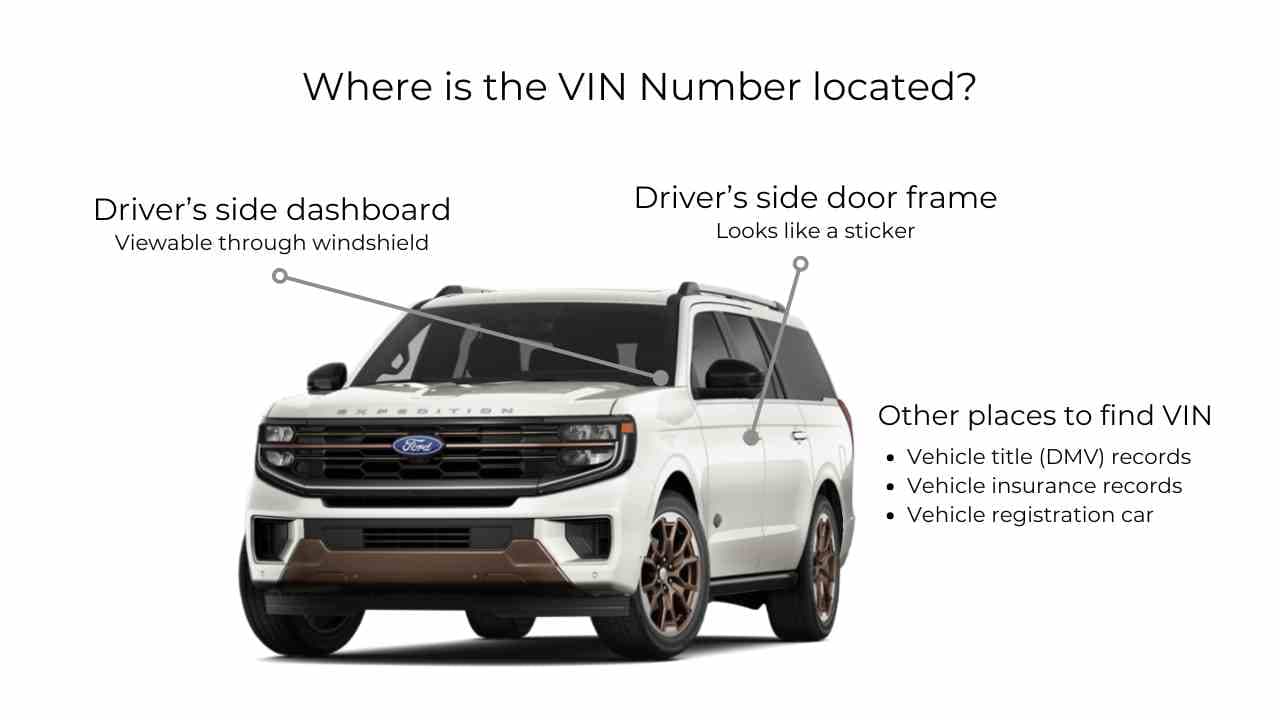
Where to Find the VIN on a Ford
The VIN is easy to find once you know where to look. Check these common spots on your car, truck, SUV, or van.
- Dashboard: Look at the driver’s side, near the base of the windshield. You can read it from outside the vehicle.
- Driver’s door jamb: Open the door and find the sticker on the frame. It often lists the VIN and other vehicle data.
- Title and registration: Your ownership papers list the full 17-character VIN.
- Insurance card or policy: Most insurers print the VIN on your card or policy documents.
Why Choose Our Ford VIN Lookup Tool?
Our tool is built to be fast, clear, and easy to use. Here is what sets our Ford VIN history search apart.
Trusted Data Sources
We pull records from reliable databases, so the report you get is accurate and up-to-date based on those data sources.
Instant VIN Lookup
Enter a VIN and see your vehicle details in seconds. You don’t need to wait for a long time to make an informed decision.
Support Modern & Classic VINs
Our tool supports both modern 17-digit and shorter classic car VIN decoding. Simply enter the VIN to find available details and records.
24/7 Customer Support
If you have questions regarding your report or our service, our trained team is ready to assist you.
Which Ford Models Do We Support?
Ford VIN checks are available for many popular models, subject to VIN and record availability.
Ford F-150 | Ford F-250 Super Duty | Ford F-350 Super Duty | Ford Mustang | Ford Explorer |
Ford Escape | Ford Bronco | Ford Bronco Sport | Ford Ranger | Ford Edge |
Ford Expedition | Ford Maverick | Ford Transit | Ford Mustang Mach-E | Ford Fusion |
Ford Focus | Ford EcoSport | Ford Taurus | Ford Fiesta | Ford Flex |
Explore Other Ford VIN Lookup Tools
Need more than a history report? Try these tools to learn even more about your vehicle using just the VIN.
Run a Full Ford VIN Check Before Buying
Don’t guess about a used Ford. Run a full Ford VIN check to view any records of accidents, title issues, mileage, liens, auctions, sales, recalls, and more. Buy or sell with full confidence.
Frequently Asked Questions About Ford VIN Check
You can check a Ford VIN using our free VIN decoder. Enter the 17-character VIN to identify basic vehicle details, such as the model year, make, model, transmission, drivetrain, and engine information, when available.
Yes, our tool allows you to search using a US license plate number. Enter the plate and select the state to find available vehicle details and determine whether further checks are needed.
Yes. A Ford VIN check can reveal reported accidents and damage records through the vehicle history report.
You can check a Ford's title history by getting the vehicle history report. Look for salvage, rebuilt, flood, or other title brands, and verify the information before purchasing.
Yes, a Ford vehicle history report shows mileage readings recorded during inspections, registrations, or service visits. Compare these readings with the odometer to identify possible inconsistencies or signs of mileage tampering.
You can usually find your Ford VIN on the driver's side dashboard near the windshield, the driver's door jamb label, or official documents such as your registration, insurance card, and vehicle title.
You can check a Ford VIN for recalls using our recall check tool to discover recall records and open recalls. Enter the VIN to see open safety recalls that a Ford dealer can fix for free.